Meet Mobile: Swim
- 2.5
- Rating
- 1.00M
- Installs
- Free
- Price

 Analysis by App-foxy
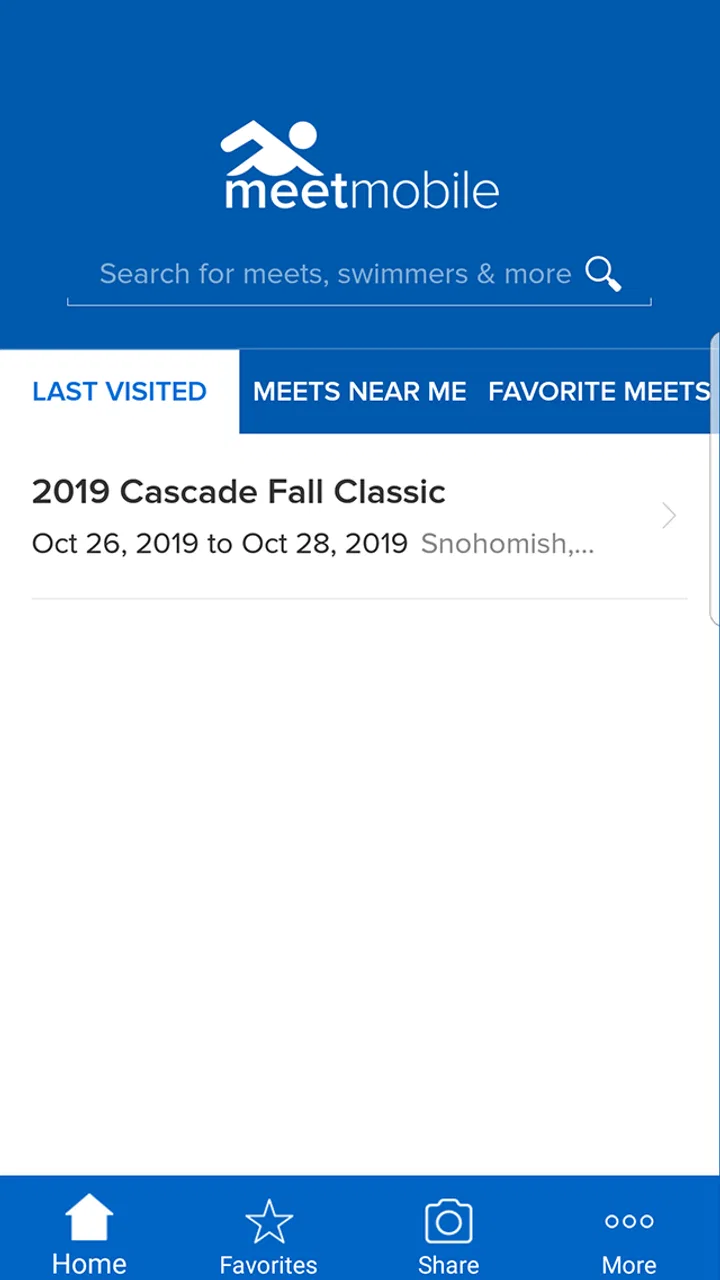
I approached Meet Mobile: Swim as a practical companion for swim-meet days rather than as a general fitness tracker. That distinction matters. Its job is to help me keep up with competitions, swimmers, event progress, and posted results, and it does that in a way that can be genuinely useful when a pool deck is crowded and the schedule is moving quickly. My overall view is positive but specific: this is most valuable when I already have a connection to organized swimming, while it is much less compelling for someone who only wants casual workout tracking.
The app is a free sports app from ACTIVE Network, LLC, with an Everyone age rating. It has been available since June 1, 2012, and its long presence in this niche gives it a clear identity. It is not trying to replace a training log, coaching platform, or social network. I see it as a meet-focused information tool, especially for parents, swimmers, coaches, and supporters who want to follow what is happening without constantly asking someone nearby for updates.
What Meet Mobile: Swim does well on a busy meet day
The strongest part of the experience is the way it brings several meet-related tasks into one place. I can use it to manage swim meets, follow swimmers I care about, and check results as they become available. Those functions sound simple, but together they solve a real problem: swimming events can involve long gaps, multiple heats, changing attention, and a lot of information that is difficult to follow from a printed program alone.
You May Also Like

 Blood Strike: 2.5 Anniversary
Blood Strike’s Loadouts Turn Every Drop Into a Tactical Gamble
A close look at Blood Strike’s custom loadouts: how fast access to signature weapons reshapes its battle royale rhythm, rewards preparation, and narrows the gap between fights.

 Pandora - Music & Podcasts
Pandora’s Music Is Easy to Start, but Harder to Recover
Pandora’s strength is its low-effort path from a seed to a station. Its weak spot is how much confidence it asks you to place in connection, setup, and quiet recovery.

 8 Ball Pool
 Is Built on Rivalries, Rematches, and Routine
A close look at the rivalries, rematches, shared routines, and unanswered safety questions that turn a quick pool match into a persistent mobile community.

 Samsung Music
’s Quiet Strength Is Playing What You Already Own
Its reach comes less from spectacle than from dependable access to a personal library. That simplicity is both the app’s strongest retention engine and its ceiling.

 AccuWeather: Weather Radar
AccuWeather Review: A Quick, Clear Forecast for Everyday Decisions
For everyday plans, the best forecast is the one you can understand quickly. AccuWeather makes rain timing, radar, and local conditions easy to act on, with a few trade-offs.

 Hill Climb Racing
Why Hill Climb Racing Still Turns Crashes Into One More Run
A tiny car, a bumpy hill and one more upgrade: Hill Climb Racing keeps resurfacing because its simple chaos makes every near-miss feel personal.
More From Our News Desk



In a realistic family scenario, one parent may be watching a child behind the blocks while another is buying food or helping a younger sibling. The second person can use the app to stay oriented instead of relying on text messages that arrive late or incomplete. If a swimmer is entered in several events, following that person creates a more focused way to keep track of the day than scanning every result manually. I found that particularly useful when the meet includes many age groups and a long sequence of races.
The real-time results angle is also more valuable than it first appears. A result page can become a quick reference after a race, helping me check whether an event has finished and whether the posted outcome is available. This is not the same as being at poolside, and it cannot remove every delay caused by meet operations, but it can reduce the need to refresh unrelated pages or search through a broad event feed.
Another strength is that the app is built around the structure of swimming rather than forcing swimming into a generic sports template. Swimmers compete in specific events, meets contain many races, and supporters often care about one person or a small group rather than an entire league. That focus makes the app easier to understand for its intended audience than a broad sports-score application would be.
I also appreciate the difference between using it before a meet and using it during one. Before the competition, it can help me identify the meet and the swimmers I want to follow. During the event, the value shifts toward quick checking: is the relevant race on the schedule, has a result appeared, and can I find the swimmer without working through every entry? Afterward, the results become a convenient record to revisit rather than something I need to reconstruct from memory.
The app is at its best when it reduces information hunting, not when it tries to become an all-purpose swimming platform. That is the central reason I would recommend it to someone involved in competitive meets. Its usefulness comes from focus, and that focus is also what defines its limits.
A workflow that saves attention rather than time alone
One practical habit is to prepare the app before arriving at the venue. I would select the relevant meet and identify the swimmers I care about while I have a stable connection and a few quiet minutes. Doing that early is more comfortable than trying to organize everything while announcements, warm-ups, and race movement are happening around me.
During the meet, I would avoid treating the app as a screen that must stay open constantly. A better approach is to use it at natural checkpoints: before a swimmer’s expected event, after the race, and when I need to confirm a result. This keeps the phone from becoming a distraction and makes the app serve the meet instead of competing with it.
There is also a useful trade-off in following individual swimmers. A focused list can make a large meet feel manageable, but it may not be enough for a coach or official who needs a broader operational view. A parent following one child benefits from the narrow focus; a coach supervising a whole squad may need to move between many athletes and events. The same design that feels calm for one audience can feel restrictive for another.
For supporters who cannot attend, the app can act as a lightweight connection to the competition. I would not treat it as a substitute for a live stream or direct communication from a team, but it can still answer the basic question of how the meet is progressing. That makes it useful for relatives, friends, or a parent at work who wants to check in without interrupting the people at the venue.
Where the experience becomes less comfortable
The clearest warning sign is the average rating of 2.6 from around 8.4 thousand ratings. That number does not erase the app’s usefulness, but it tells me that the experience is not consistently smooth for everyone. A person deciding whether to rely on it should keep a backup habit: know the meet’s official communication method, keep the program if one is available, and do not assume a mobile result page is the only source of truth during an important race.
Meet information can be complicated before the app even enters the picture. Different competitions may organize entries, schedules, and results in different ways, and the quality of the experience can depend on how the relevant meet is represented. That means I would judge the app partly by the specific competitions I attend. If the meets I care about are easy to locate and their results appear clearly, the app becomes much more useful. If my local events are poorly represented or difficult to navigate, its practical value drops quickly.
There is also a psychological limitation to real-time result checking. It is tempting to refresh repeatedly, especially when a swimmer’s event is approaching. That can create more frustration than clarity if there is a normal delay between a race finishing and its result becoming visible. I would use the app as a convenient update channel, not as a guarantee that every change will appear the instant it happens.
The free price makes trying it easy, but in-app purchases range from $0.99 to $29.99 per item. I would pay attention to what is included in the basic experience before deciding whether any optional purchase is worthwhile. For a family that follows one or two swimmers occasionally, a paid add-on may not offer enough value. For someone who attends many meets and depends on the app regularly, the calculation could be different, but the decision should be based on actual use rather than assuming every extra is necessary.
Another limitation is scope. I would not install this expecting detailed swim workouts, stroke analysis, wearable integration, calorie tracking, or a complete season-long training history. Those are different needs. A training app is better for recording personal practice, while a team-management system may be better for coaches handling rosters and communication. Meet Mobile: Swim earns its place by concentrating on competition information, not by covering every part of swimming.
Who should use it, and who should look elsewhere?
I think the best audience is people who regularly follow organized swim meets. Parents are an obvious fit because the app can reduce the effort involved in tracking a child across a dense schedule. Swimmers can use it to review meet information and results, while supporters can follow a favorite athlete when they are not physically present. Coaches may also find it helpful as a supplementary reference, especially when they need quick access to event progress rather than a full coaching workspace.
The app is also a reasonable choice for a swimmer who competes only occasionally but wants one familiar place to check meet results. Since it is free to download, the barrier to testing it is low. I would still do a small trial first: locate a meet I know, search for a swimmer I can verify, and check whether the information is presented in a way that feels clear. That test tells me more than a general promise because the usefulness depends on the competitions I actually follow.
I would recommend skipping it if my main goal were personal fitness. Someone who swims for health, relaxation, or independent training may find little reason to spend time with a meet-centered tool. A general fitness app or swim log would be a better match for tracking distance, sessions, and habits. Likewise, someone who needs official team messaging, attendance, billing, or detailed roster administration should look for a dedicated team-management solution rather than expecting this app to handle those responsibilities.
It may also be the wrong choice for a person who wants a polished, all-in-one spectator experience with video, commentary, and extensive athlete profiles. The app’s core value is information around meets and results. If I want rich media or a broad social experience, I would compare it with the event organizer’s own channels and other sports platforms. Those alternatives may offer a better presentation for watching, while this app can remain useful for checking the underlying competition details.
Older devices deserve a little attention as well. The current version is 5.0.1.2327 and requires operating system version 10 or later. Before relying on it for an important meet, I would check compatibility on the phone or tablet I plan to carry. That is especially important for families using an older spare device for children, since discovering a compatibility problem at the venue is much more inconvenient than discovering it at home.
How it compares with ordinary alternatives
The most common alternative is probably the printed meet program or a message from a coach. Paper can be dependable and easy to share, but it becomes outdated when schedules shift or when I need a result rather than an entry list. Team messages can provide useful context, yet they depend on someone noticing the update and sending it. Meet Mobile: Swim sits between those options: more focused and dynamic than paper, but not necessarily as personal or authoritative as direct communication from the team or organizer.
Another alternative is a general sports-score app. Those apps can be excellent for major professional competitions, but swimming meets often require more specific navigation through events, heats, and individual swimmers. A broad score app may not understand the way a local meet is organized. The dedicated focus here is a meaningful advantage when the competition is supported well.
Official event websites can sometimes be the better option for a complete desktop view, downloadable documents, or formal announcements. I would use those when I need comprehensive meet administration or when the mobile experience feels cramped. The app is more convenient for quick checks on a phone, particularly while moving around a venue, but convenience does not automatically make it the most complete source.
For results after the meet, a team’s own records or a dedicated swimming database may be more suitable depending on what I want to review. The app is strongest close to the event itself. I would not assume that a meet-following tool should replace a long-term personal archive, especially if I want to compare seasons, analyze improvement, or maintain detailed training notes.
Small decisions that improve the experience
My first tip is to separate “following a swimmer” from “understanding the whole meet.” If I only need updates about one athlete, I should keep the view narrow and avoid unnecessary browsing. If I am helping a coach or supporting several teammates, I should expect more manual checking and plan around the meet program rather than assuming one personalized view will cover everything.
My second tip is to verify the event context before reacting to a result. A name alone is not always enough when swimmers share similar names or when several age groups are competing. I would check the event and meet details before treating a posted time or placing as the result I wanted. This simple pause helps prevent confusion in a large competition.
My third tip is to treat the app as one part of a meet-day setup. I would carry a charger or keep the phone available for other communication, because constant result checking can consume attention and battery. More importantly, I would keep the organizer’s contact or information channel accessible. That is not a criticism unique to this app; it is a sensible safeguard whenever live event information matters.
My fourth tip is to decide whether optional purchases solve a real problem before spending money. The free version may be enough for occasional spectators, while frequent users may value an added convenience. I would measure that against how many meets I attend and how often I actually use the feature, rather than paying simply because an upgrade is visible.
My final recommendation
After using it as a meet companion, I see Meet Mobile: Swim as a specialized tool with a clear purpose and uneven appeal. It can make competitive swimming easier to follow by bringing meet access, swimmer tracking, and result checking into a mobile workflow. For a parent waiting through a long session, a swimmer reviewing competition information, or a relative following from a distance, that focus can be genuinely worthwhile.
At the same time, the modest average rating, the possibility of delays or inconsistent meet presentation, and the optional purchase range mean I would not rely on it blindly. I would test it with the specific meets I care about, keep an official backup source, and avoid expecting training or team-management features that belong to other kinds of apps. Those precautions do not cancel its strengths; they put them in the right context.
The developer is ACTIVE Network, LLC, and the app has passed the half-million-install mark, so it is established enough to be familiar in this niche. My recommendation is therefore conditional but clear: competitive swimming families and regular meet followers should try it, while casual swimmers should probably choose a fitness-focused alternative. If your day revolves around finding a swimmer, checking an event, and confirming a result, this app can earn a place on your phone. If your needs extend beyond the meet itself, it works better as a supporting tool than as your complete swimming solution.
FAQs for Meet Mobile: Swim
01What features does Meet Mobile: Swim offer to enhance the swim meet experience?
Meet Mobile: Swim provides real-time results, heat sheets, and event schedules directly to your mobile device. This app allows users to track favorite swimmers and teams, view personal bests, and access past performance data. It also offers live updates and push notifications to keep you informed about event changes and results.
02Is Meet Mobile: Swim available for both Android and iOS devices?
Yes, Meet Mobile: Swim is available for download on both Android and iOS platforms. You can find it on the Google Play Store for Android devices and the Apple App Store for iOS devices. This ensures that a wide range of users can benefit from its features regardless of their device preference.
03Does Meet Mobile: Swim require a subscription or any in-app purchases?
Meet Mobile: Swim offers both free and premium options. While you can access basic features at no cost, some advanced functionalities such as detailed heat sheets and real-time scoring might require a subscription or in-app purchases. This allows users to choose the level of access that best suits their needs.
04How accurate and reliable is the data provided by Meet Mobile: Swim?
The data on Meet Mobile: Swim is sourced directly from meet organizers, ensuring high accuracy and reliability. However, it’s important to remember that data updates are dependent on the event’s management team. Users are encouraged to verify results with official sources if precision is critical.
05Can I use Meet Mobile: Swim to follow multiple swim meets simultaneously?
Yes, Meet Mobile: Swim allows users to track multiple meets at the same time. You can easily switch between different events and keep up with the latest results and schedules. This feature is particularly beneficial for users interested in following various teams or swimmers across different competitions.
Pros
- Real-time meet results enhance user experience.
- Customizable alerts for event updates.
- User-friendly interface for quick navigation.
- Supports multiple swimmer tracking.
- Comprehensive event search functionality.
Cons
- Occasional app crashes disrupt usage.
- Limited offline accessibility.
- Subscription required for full features.
- High battery consumption during use.
- Some features require stable internet.

Meet Mobile: Swim
Gallery